Live Wallpaper 2.6 Mac Download
There'south something heady about buying a new piece of software, unwrapping the packaging and slipping the disc into your Mac ready to install your new goodies. And, of course, the new Mac App Store has fabricated the process of obtaining new software by a digital download just a few simple mouse clicks.
Whichever method you adopt, the biggest drawback is the coin you have to manus over. Forking out for your goods is a necessary evil, and the price of things is usually a proficient indicator of its quality. But the good news is it's not e'er that manner, especially when information technology comes to Mac software.
As we volition prove you lot, at that place are many apps available for gratuitous that have all the polish and avant-garde features you would expect from a premium paid-for version, merely without the nasty price tag. There are apps that volition clean upward your hard bulldoze or organise your day-to-day activities. Some even piece of work on your iPhone and iPad, too.
We've presented the best ones beneath – they're all really fantastic and, best of all, they're all free.
A number of these applications, while however great as a gratis version, besides have more fully featured pro versions. Then if you really savor one, yous tin consider spending the actress coin.
- Mac VPN - discover the best you tin get to proceed your Mac secure online
All-time free Mac media tools
i. Boxee Online

Television set channels put a lot of their content online for free, but you usually accept to go to their websites to observe out what'due south bachelor. Not with Boxee.
This app lets you browse through episodes of shows from sources such as YouTube, among many others. It as well pulls in media from your Mac. The interface can exist controlled via the keyboard, an Apple remote or the complimentary Boxee app available for iPhone, iPad and iPod touch.
Information technology's a doddle to navigate, enabling yous to quickly find sports, movies, music or photos to enjoy on your reckoner. For entertainment on your Mac, Boxee is hard to trounce.
2. Vuze

BitTorrent clients take received a bad rap over the years for enabling users to download copyrighted material for free. Vuze is no different in this respect. That said, downloading via BitTorrent is not illegal and, should you be accessing legal material, you're fine.
Even better than that, Vuze volition act every bit a media role player for most formats and even convert files for playback on your devices, including iPads and games consoles. Y'all can even stream video from Vuze via Wi-Fi to compatible devices such as the Xbox 360, making information technology more of an ideal media viewing solution than a nuisance to order.
3. Flip4Mac
There's been little love lost between Apple and Microsoft over the years, and the same extends to their media formats. The dreaded .WMV (Windows Media Video) file is the scourge of the Mac Bone X operating system and volition not run natively in QuickTime.
Fortunately, the complimentary Flip4Mac software volition eradicate this headache and, once installed, lets you forget almost formats and enjoy the video you are afterward. The WMV actor also allows for Windows Media files to play back in Safari as well to assist you enjoy a more complete browsing experience. A must-have install to convalesce format folly.
4. HandBrake
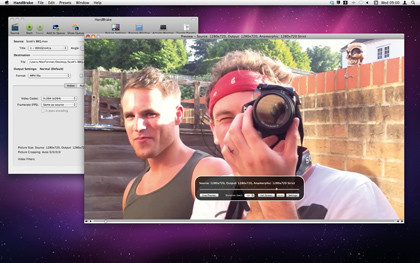
Those looking to bring their pic collection into the modern world should certainly consider HandBrake for all their ripping needs. This unproblematic app tin grab a flick from DVD and encode it into a variety of formats for playback on your Mac, iPhone or iPad.
Those with the new Apple tree Boob tube will also be able to create compatible files from their motion picture discs and add together them to iTunes without having to fiddle effectually with DVD players and tons of cases. The app can even retain the chapter selection features and subtitles of your original disc.
While ripping a DVD to your Mac can accept some time (and please respect copyright) if handled right, the issue makes accessing your entertainment a groovy deal easier. The latest version of HandBrake introduces a live preview feature that allows y'all to check the quality of your rip before committing to hours of encoding too. You can also use HandBrake to convert video files into different formats.
5. Spotify
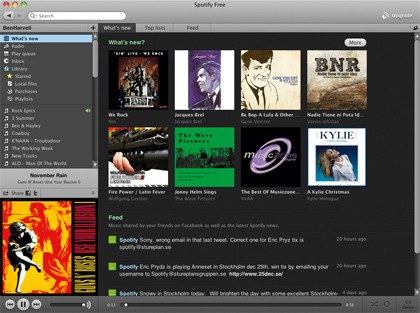
Spotify came from out of nowhere and took the music lovers of Europe by tempest. This is streaming music done right. This service is free to those who can handle an advert every 3 songs or and then. It offers a catalogue of more than 10 million songs of all genres, which stream instantly through the Spotify app.
Information technology can also link to your iTunes library and then all of your favourite tracks are in i place. You can log in from multiple Macs using your Spotify business relationship, create playlists, share music with friends and more.
One of our favourite features is the innovative collaborative playlist, where your friends tin add tracks over the internet for you to listen to. If you wish, you tin pay to upgrade Spotify to a premium business relationship, at which bespeak you become ad-free.
And for £9.99 per month you lot can even have the same service on your iPhone with music stored for offline playback.
vi. VLC

VLC is one of those apps you can turn to if QuickTime and other media-playing apps won't work with a media format you desire to use. Initially, you might wonder why yous'll ever need this app, only if you lot ever stray beyond the premises of the iTunes Store and download video from another online source, you're more than likely to encounter a problem – that is, it's non playing properly in iTunes or QuickTime.
Converting the video with HandBrake is always an option, simply, to be honest, using VLC is simply quicker. The app can handle DVD playback equally well equally more obscure formats that crop upwards from time to time.
Files that are missing pieces or cleaved can still exist played in VLC to the best of its ability and information technology provides a wealth of codecs to help your Mac handle all kinds of media file formats.
VLC is an application that every Mac user should have installed for when their media won't behave.
Social apps for Mac
7. AddressBookSync
The Address Book app on your Mac is great for organising contacts and syncing them to your iPhone. However, the problem is with and so many contacts held, continually calculation information and profile pictures can become a fourth dimension-consuming task.
AddressBookSync is an ingenious tool that connects to your Facebook account to pull in your friends' birthday info too as images from their accounts into your Mac's Accost Volume. This is specially handy for iPhone users with images appearing on screen when a contact is calling.
8. Adium
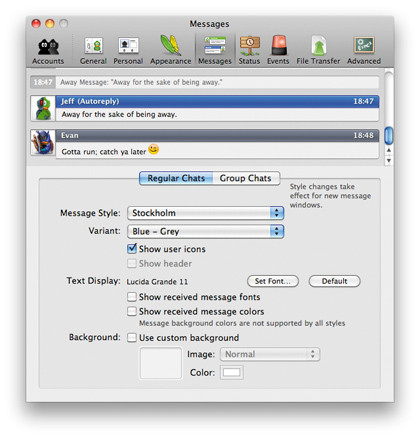
The chances are you have an account for more than one instant messaging client. With and then many available from iChat to Windows Messenger through Google Chat and Yahoo! it'south not surprising.
So, do yous get out all of these clients open and consuming memory or exercise yous notice an all-in-one solution? If yous want the latter, Adium is your app.
Compatible with more IM clients than you probably knew existed, Adium combines all your accounts into one easy-to-employ solution then yous tin go along in impact with all your contacts regardless of the service they are using.
9. Twitter
This is the official Twitter app for Mac. It was launched at the same time as the new Mac App Store, and quickly became the nearly popular download at that place. To get it you'll need to have the Mac App Store installed (which means yous'll demand to exist running Os X x.vi and have installed the latest organisation updates).
Unlike other Twitter clients, Twitter offers a very OS 10-friendly surroundings without skimping on the features you need to enjoy your 140-graphic symbol ready.
A particularly great characteristic is that y'all can view all tweets in a conversation but past double-clicking on the chief tweet. You lot can also search for trending topics and apply multiple accounts within the same app.
Composing a new tweet is now made far easier with the Compose window that floats outside the interface, ready for yous to type your thoughts. If y'all want to add an image to your tweet simply elevate and drop it into the new tweet window.
Yous can select which image hosting service yous use from the Preferences pane, and too which URL-shortening service the Twitter app volition employ. You can also become the official Twitter app for iPad and iPhone to consummate your Twitter feel wherever you are in the world.
ten. Skype
Skype isn't a new service only the way it has adult over the years keeps it incredibly useful. The premise is unproblematic, with an internet connection and a re-create of the free software installed, you can talk to anyone on Skype via audio or video chat. And yous can even swap files, create conference calls or simply chat via instant messaging.
For an additional fee, you lot tin add voicemail to your business relationship and fifty-fifty phone call mobiles and landlines if you wish.
Handy utilities
11. Evernote
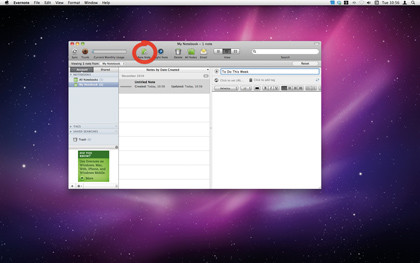
Any you're doing in life there are things you need to recollect, be they pictures, notes, websites or sounds. Evernote provides a place to store your ideas, plans and reminders.
Using cloud-based storage, the Mac app syncs with your iPhone and iPad, as well as any other computer to keep your notes close to hand whenever y'all need them. Unique search features allow you to dig out annihilation you've stored and it tin can fifty-fifty recognise handwritten docs.
This app not only organises your notes, photos, screenshots and more than, just you can add custom tags to make things easier to search.
12. r-name
Have y'all ever had a bunch of files in a binder and and then discovered yous need to rename each i? For a renaming task that comprises more than than ten files or more it tin can become a very dull and repetitive task.
And that's where r-name comes in. It's a simple, gratuitous app that allows files and folders to be dropped in and renamed in whatsoever fashion you require. Platonic for photos or television series, this app will save a great deal of time.
13. Burn
While it's easy to burn a CD or DVD from within Mac OS X, Burn down brings simplicity, as well as advanced options to the task. For example, it allows you to set which file system your disc will use and then Windows owners tin can access files.
It can create audio CDs and MP3 discs, and caters for DVD, VideoCD and DivX discs. An Inspector tool allows you to change settings on your disc such equally file permissions, dates and the icon.
14. Carbon Copy Cloner
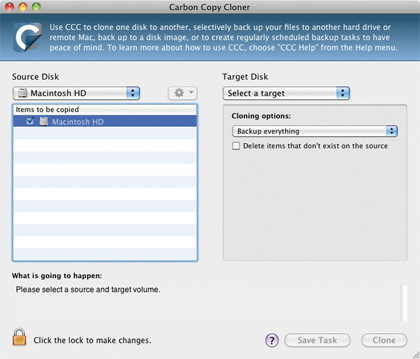
Anybody talks about backing up their computer files, but how many of us are committed to doing information technology properly?
Carbon Copy Cloner makes it easy to back up your system simply to motility it to another Mac or larger hard bulldoze without having to reinstall the Os. Information technology even offers incremental backups, which only updates files that have changed since y'all last ran the software.
Because this is a free application, it'southward an absolute powerhouse for any Mac user who wants security for their system and flexibility for their hardware.
Live Wallpaper 2.6 Mac Download
Posted by: mooretaitorelicke.blogspot.com